
If you are using Horizon Contact in the browser and the browser tab enters a sleep state it will stop communicating with the Horizon Contact backend and will mark the agent as unavailable even if they are still present on the device. The platform can’t distinguish this behaviour from the browser being closed or the machine being turned off (where the agent hasn’t logged out first).
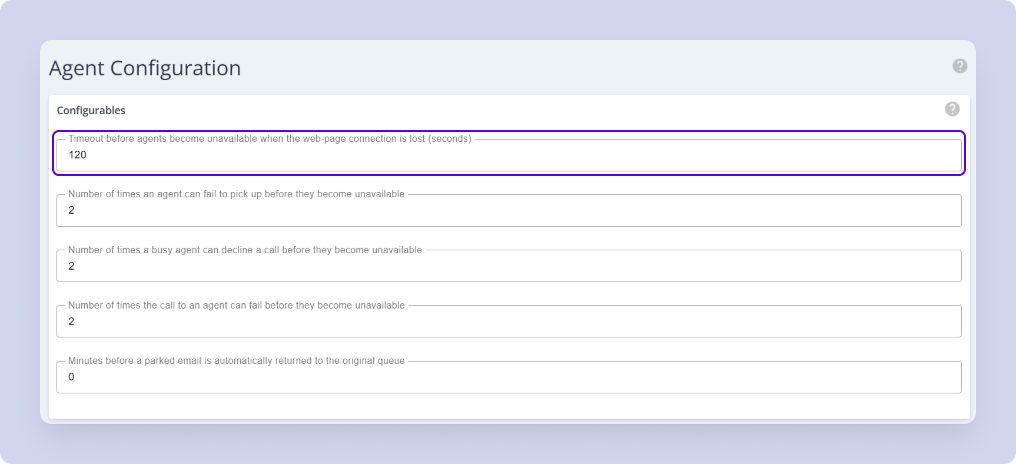
To combat this administrators can configure a timeout period that means the agent won’t be marked as unavailable until a certain time period has passed. The timeout can be customised as required. Agents will still receive calls within the timeout period and after that period calls will no longer be presented to the agent.
| Note: Changing the length of the timeout may mean that calls are presented to an agent after an agents has closed their browser or shut down their machine. |
Configuring the timeout period is managed in Agent Configuration:
Troubleshooting #
If this is set but users are still experiencing any of the following:
- User status changes unexpectedly while still signed in
- Happens after the Contact tab has been in the background for a period
- Status may return once the tab becomes active again
- Can persist even when sleep exceptions were configured centrally, if not applied to the affected browser itself
Then the following steps need to be taken:
- Confirm the Contact URL used by affected users
- Add the Contact URL as a browser tab sleep exception – verify the exception is visible on the affected user’s browser, not just in group policy
- Restart the browser to ensure the new settings take effect
- Monitor – leave Contact in the background and verify the user stays available