Skip to content
  • Administrator Knowledge Base
  • Supervisor Knowledge Base
  • Agent Knowledge Base
  • Administrator Knowledge Base
  • Supervisor Knowledge Base
  • Agent Knowledge Base
Administrator Knowledge Base
Release Notes
Administrator Knowledge Base

Administrator Portal and Setup

  • Quick Setup Guide
  • Setup Guides and Templates
  • Privileges summary
  • Horizon Contact AWS migration guide
  • Administrator Portal Overview
  • Full Setup Guide
    • Setup 1: Setting up agents
    • Setup 2: Preparing assets
    • Setup 3: Assigning user groups
    • Setup 4: Creating queues
    • Setup 5: Multiple groups
    • Setup 6: Queue Numbers
    • Setup 7: Adding audio files
    • Setup 8: Customising queue recordings
    • Setup 9: Customising agent recordings
    • Setup 10: Queue KPIs
    • Setup 11: Advanced setup
    • Setup 12: Queue Announcements
    • Setup 13: Callback setup
    • Setup 14: Customising time ranges
  • Administrator Information
    • What I can see on my screen after I log in
    • Change password
    • Change Language
    • Searching a list
    • Searching a dropdown list of items
  • Contact Recording Guides
    • How call recording works
    • Introduction to Agent and Queue Call Recording
    • Introduction to Webchat Recording
    • Call recording scenarios

Staff Management

  • Status data report
  • Users
    • Resetting user passwords
    • Modifying an existing user account
    • Viewing agent contact details
    • Setting the IVR PIN
    • Configuring recording for a user
    • Viewing agent capability
  • Groups
    • User groups
    • Creating and adding a user group
    • Editing or deleting a user group
    • Copying a user group
  • Roles
    • Roles, privileges and profiles
    • Best practice when creating different versions of a role
    • Managing roles
    • Assigning and Customising Roles and Privileges
  • Break Reasons
    • Managing break reasons
    • Break reasons overview
  • Holiday Lists
    • Create a holiday list
    • Manage Holiday Lists
  • Time Ranges
    • Managing time ranges
    • Creating and adding a time range
    • Defining rules for a relative time range
    • Defining rules for an absolute time range
    • Editing or deleting a time range
    • Copying a time range
  • External Destinations
    • Managing external destinations
    • External destinations
    • Recording External Destination Calls

Calls Management

  • Simultaneous ringing overview
  • Scheduling a call
  • Direct calls overview
  • Call data reports
  • Call Flows
    • Call routing flows
    • Modify user-configurable parameters for call flows
    • Call Flow Tutorial
    • Setting up an auto attendant for BC/DR Treatments
    • Call Flow Templates
      • Call Flow Tips and Tricks
      • Call Flow Templates
      • Call Flow Template 1
      • Call Flow Template 2
      • Call Flow Template 3
      • Call Flow Template 4
  • Service Numbers
    • Managing service numbers
    • Update a service numbers call flow or user-configurable parameters
    • Update an existing service number
  • Campaigns
    • Viewing campaign progress
    • Importing lists of campaign numbers
    • Create an outbound campaign
    • Managing outbound campaigns
    • Managing campaign numbers
    • How do campaigns work?
  • Queues
    • Call queue introduction
    • Create a call queue
    • Managing call queues
    • Assigning agent groups to a call queue
    • Configuring agent outbound dialling
    • Configuring wrapup settings
    • Adding queue audio
    • Managing in-queue audio
    • Defining when in-queue announcements are played
    • Configuring opt in/out options for caller recording
    • Customising agent call recording buttons
    • Configuring call recording for queues
    • Defining call-queue KPIs
    • Configuring advanced settings for a call queue
    • Configuring callbacks for a queue
    • Configuring callback slots for a queue
  • Playbooks
    • Managing play books
  • Audio Files
    • Managing audio files
    • System audio files
    • Adding audio announcements
    • Text-to-speech overview
    • Uploading Audio Files
    • Generate text-to-speech audio
  • Area Codes
    • Create an area-code group
    • Managing an area-code group
    • Importing and exporting area-code numbers
  • Number Lists
    • Managing number lists
    • Importing number lists
  • Global Variables
    • Managing global variables
  • Surveys
    • Managing after-call surveys
    • How after-call surveys are handled
    • Configuring survey parameters
  • Call Slots
    • Managing call slots
    • Callback slot announcements
    • What are call slots?
    • What are callbacks?

Flow Management

  • Introduction to Routing Flows and the Flow Editor
  • Benefits of Routing flows
  • Managing Routing Flows
    • Introduction to Node types
    • Node Parameter Values
    • Create and publish a new routing flow
    • Making nodes available from the Node Type library
    • Configuring nodes in a routing flow
    • Configuring variables in a routing flow
    • Adding user-configurable values
    • User-configurable parameter options
    • Additional flow editor functionality
    • Managing existing routing flows
    • Importing or Exporting a routing flow
    • Routing Flow Templates
  • Standard Node Types
    • Caller interaction node types
    • Branching node types
    • Queue node types
    • Email node types
    • Company configuration node types
    • HTTP node types
    • External destination node types
    • Call delivery and routing node types
    • Outdial node types
    • Webchat node types
    • Miscellaneous node types

Webchat Management

  • Webchat overview
  • How the web-client interface works
  • Managing Webchat services
  • Webchat data reports
  • Classifying a webchat
  • Webchat Queues
    • Configuring advanced settings for a chat queue
    • Creating and managing a webchat queue
    • Defining chat-queue KPIs
    • Defining when in-queue announcements are displayed
    • Webchat queues overview
    • Assigning agent assets to a webchat queue
  • Webchat Flows
    • Managing Webchat flows
    • Modify user-configurable parameters for Webchat flows
    • Webchat flow templates
      • Chat flow templates
      • Chat Flow Template 1
      • Chat Flow Template 2
      • Chat Flow Template 3
      • Chat Flow Template 4

Email Management

  • Email overview
  • Email data reports
  • Supporting a shared email address
  • Settings required for adhoc outbound email
  • Classifying an email
  • Email Servers
    • Email Server recommended settings
    • Email Server Setup Guide
    • Viewing the default system email server
    • Viewing the email servers’ status
    • How email servers and authentication work
    • Managing email servers
    • Email Server Setup Guide
      • Email 1: Setting up users for email
      • Email 2: Setting up groups for email
      • Email 3: Creating text blocks for email
      • Email 4: Preparing assets for email
      • Email 5: Creating email classifications
      • Email 6: Creating email queues
      • Email 8: Email server settings
      • Email 7: Email Flow Templates
  • Email Flows
    • Managing email flows
    • Modify user-configurable parameters for email flows
    • Email Flow Templates
      • Email Flow Template 1
      • Email Flow Template 2
      • Email Flow Template 3
  • Email Queues
    • Email queues overview
    • Creating and managing an email queue
    • Defining email-queue KPIs
    • Configuring advanced settings for an email queue
    • Assigning agent assets to an email queue

SMS Management

  • SMS overview
  • Configuring SMS Templates
  • Configuring SMS From Addresses
  • Create an SMS queue
  • Configuring automated SMS
  • Managing SMS queues
  • Outbound SMS data reports

Safe-Pay Management

  • The cardholder’s view
  • How Safe-Pay works
  • Merchant Configuration
  • Configure Payment Queues
  • PSP Configuration
  • PSP – Link Delivery
  • Editing or deleting a payment queue
  • Configuring Safe-Pay
  • PSP – Additional Parameters
  • PSP – Advanced Limits
  • PSP – Digital Wallets for Stripe PSP Configuration
  • Safe-Pay data reports

Agent Assets Management

  • Agent scripts overview
  • Configuring agent scripts
  • Configuring agent script sections
  • Configuring text blocks
  • Managing text blocks
  • Managing attachments

Data Management

  • Reports
    • Introduction to Reports
    • Data Reports
      • Create and Export a Data Report
      • Edit Data Reports
      • Auto-generate Data Reports
      • Data Reports – Data Source and Aggregation options
      • Data Report Types
        • Call Data Reports
          • Service Number Report
          • Queue Report
          • Agent Report
          • IVR Report
          • Call Classifications Report
          • Call Transfers Report
          • Queue Transfers Report
          • Voicemail Report
          • Callers Report
          • Call Flow Report
          • Calls Report
          • External Destination Report
          • Scheduled Calls Report
          • Unreturned Missed Calls Report
          • Dropped Calls Report
          • Generate a Queue Abandoned Calls Report
          • Generate a Queue Service Level Report
          • Call Trace Reports
        • Status Data Reports
          • Working Hours Report
          • Break Reasons Report
        • Diagnostic Reports
          • Activity Audit Report
          • Status Change Report
        • Email Data Reports
          • Email Agent Report
          • Email Queue Report
          • Email Flow Report
          • Email Classifications Report
          • Inbound Emails Report
          • Outbound Email Agent Report
          • Outbound Email Template Report
          • Outbound Email Recipient Report
        • Webchat Data Reports
          • Webchat Queue Report
          • Webchat Flow Report
          • Webchat Agent Report
        • Outbound SMS Data Reports
          • Recipient Report
          • Outbound SMS Agent Report
          • Outbound SMS Template Report
        • Safe-Pay Data Reports
          • Contact Safe-Pay Payments Report
          • Contact Safe-Pay Agent Report
    • Contact Reports
      • Create and Export Contact Reports
      • Edit Contact Reports
      • Auto-generate Contact Reports
      • Contact Report Types
        • Survey data
        • Agent scripts data
  • Wallboards
    • Managing wallboards
    • Customising a wallboard
    • Wallboards overview
    • Filtering the Agents Overview widget
    • Filtering wallboard widgets
    • Filtering the call queues for Company Summary widgets
  • Classifications
    • Managing classifications
    • Classifications Overview

Customer-related tasks

  • CRM overview
  • Creating a new contact record
  • View a customer’s contact record
  • Modifying a customer’s details
  • Bulk Deletion of CRM Records
  • Deleting webchat conversations from customer contact records
  • Importing customer details
  • Exporting customer details
  • Configuring custom fields and tags
  • Assigning tags to a customer record
  • Managing columns

CRM Integration

  • Contact CRM Integration Developer Guide
  • Salesforce Integration
    • Introduction to Salesforce integration
    • Salesforce Integration procedure
  • CareConnect 2.0 Integration
    • Introducing CareConnect 2.0
    • Download CareConnect 2.0
  • Zendesk Integration
    • Zendesk Integration procedure
    • Using Contact with Zendesk
  • CareConnect Integration
    • Contact CareConnect Integration procedure
    • Using CareConnect
  • ConConnect Integration
    • Introduction to ConConnect
    • ConConnect Integration procedure
    • Configuring ConConnect
  • Microsoft Dynamics Integration
    • Introduction to Microsoft Dynamics Integration
    • Microsoft Dynamics integration procedure

System Management

  • Displaying the online help
  • Run Contact via Microsoft Edge
  • SFTP Destinations
    • Configuring an SFTP destination
  • Reporting destinations
    • Add Reporting Destinations
    • Managing Reporting Destinations
  • Themes
    • Managing system themes
  • Media Files
    • Managing media files
  • Agent Configuration
    • Configuring agents’ unavailability
    • Configuring what agents can view on their web portal
  • Email Editor Options
    • Configuring email editor options
  • Assets Configuration
    • Configuring system assets
  • Channel Configuration
    • Channel blending
    • Configuring system channels
    • Changing the blending formula of channels
    • Changing the importance weighting of a channel queue
    • Changing Agent Capacities
  • Organisation Configuration
    • Configuring ODS codes for automated NHSE reporting

Troubleshooting

  • How to prevent Contact users from going unavailable when the browser tab sleeps
  • Capturing intermittent faults using Bug Tracking
  • WebRTC Diagnostics Overview
  • Understanding WebRTC diagnostic tests
  • Home
  • Docs
  • Administrator Portal and Setup
  • Horizon Contact AWS migration guide
View Categories

Horizon Contact AWS migration guide

From September, the Horizon Contact infrastructure will be migrating from our own data centres into scalable public cloud infrastructure operated by Amazon Web Services (AWS). This move brings exciting benefits to customers, allowing us to scale faster as we grow and lay the foundation for future integrations and flexibility.

Information for new vs existing customers #

New customers:

New customers will automatically be onboarded to the cloud-based version of Horizon Contact and will be able to access the platform via https://horizon.contact.gammagroup.co.

Existing customers:

Existing customers will continue to access Horizon Contact using the current URL https://contact.unlimitedhorizon.co.uk/, and migrations of existing customers will begin in Q4.

Note: For both new and existing customers, it’s important to ensure any additional integrations or apps are configured using the most up-to-date version of the files or URLs. You can find links to the relevant articles with this information below.

Key changes #

CareConnect and ConConnect Apps: #

It is also essential that customers use the latest version of the CareConnect and ConConnect apps. For existing customers, this update must be made before migration in Q4 (exact dates TBC).

The apps are available to download in the following articles.

  • Contact CareConnect Integration procedure
  • ConConnect Integration procedure

Network Configuration: #

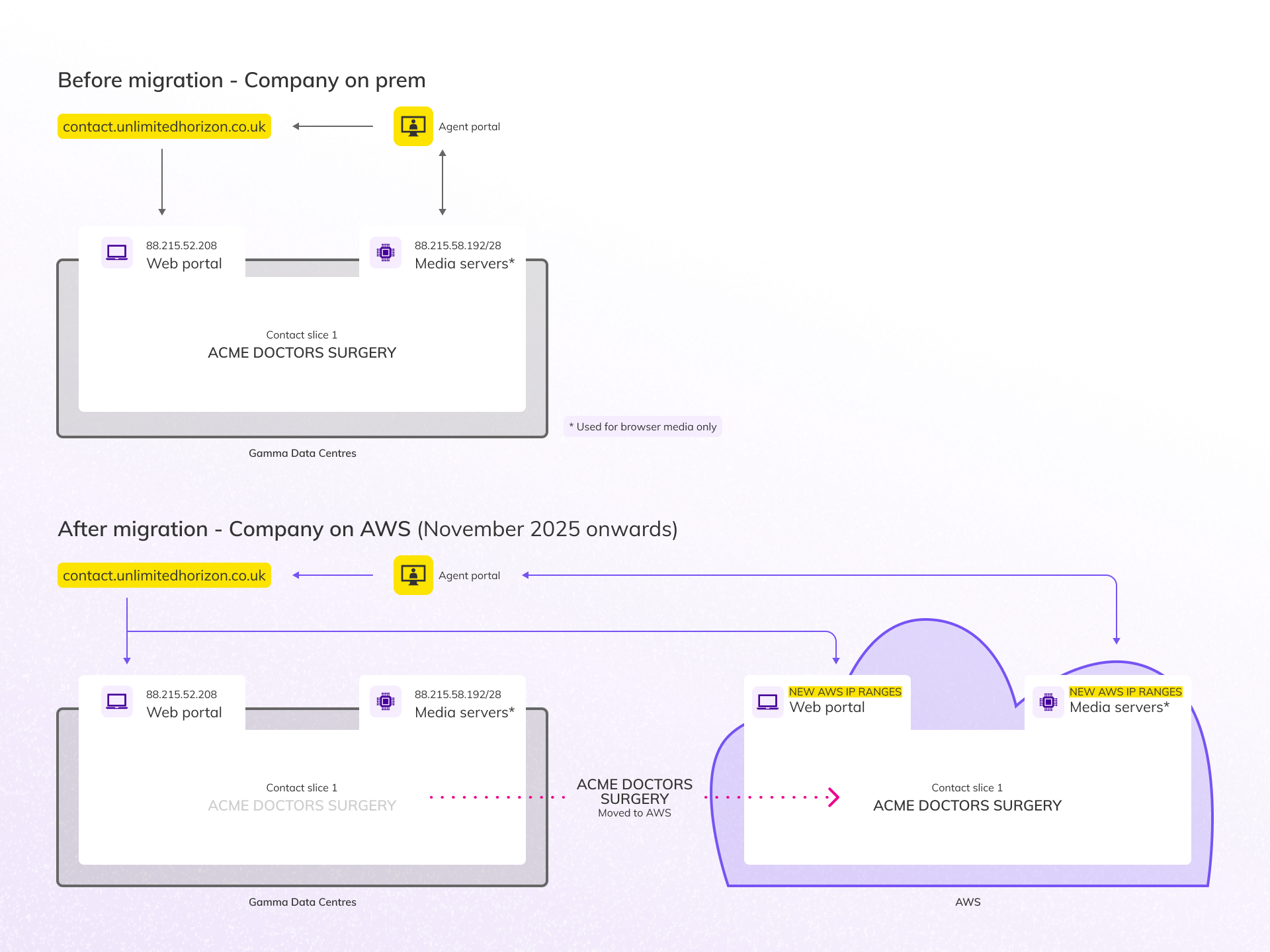
The network will need to have IP ranges updated as the cloud platform uses separate IP ranges from the existing platform. Firewall updates are mandatory for any customers who restrict Contact connectivity. The new ranges and information on how to configure this can be found in the Network Configuration Guidelines which are available on the Gamma Academy Knowledge Base.
Good to know #

Why the move? #

This migration is a key step in evolving Horizon Contact to better serve our customers.

Moving to AWS enables us to:

  • Scale faster as we grow.
  • Deliver new features more quickly.
  • Lay the foundation for future integrations and flexibility.

We’re managing the transition carefully to ensure a smooth experience.

What’s staying the same #

We’re doing a lot of work behind the scenes to make this transition as seamless as possible. Here’s what won’t change:

  • URL continuity for existing customers: When migrated, customers will still be able to use their current URL to access the platform.
  • SSO Access: Partners signing into Horizon Contact via the Gamma Portal will still be able to click through as usual. The portal will direct logins to the correct URL automatically.
  • User onboarding: New customers will continue to receive user account creation emails. If they’re on the new URL, the links will simply point to the new platform; no extra steps are needed.
  • Customer experience: There are no frontend changes to Horizon Contact. Aside from the URL, the platform will look and behave the same for both new and existing customers.

What you need to do #

To ensure a smooth experience for customers on the new platform, please take the following actions:

  1. CareConnect (Optum/EMIS and SystmOne) and ConConnect setup:
    • Make sure you’re using the new version of CareConnect/ConConnect which supports both URLs.
  2. Navigating between companies:
    • When switching between companies in Horizon Contact, you’ll now only see companies that are on the same URL. This is a change from the previous experience where all companies were visible.
  3. New URL awareness:
    • Companies signing up from September – and partners accessing it via SSO – will see a different URL in their browser. Please ensure your teams and customers are aware of this.
  4. Update your user guides:
    • If you’ve created your own documentation or guides for Horizon Contact, please update it to reflect:
      • New URLs.
      • Integration steps.
      • Network configuration requirements.
  5. Update network configuration:
    • Customers on the new URL will need to follow a different set of firewall rules. This applies to any customers who manage their own network configuration.
    • Firewall updates are mandatory: calls will not work without them.
  6. Update spam filters:
    • System emails, such as reports or password reset emails, will come from noreply@horizon.contact.gammagroup.co. Please ensure your spam filters are updated to ensure you can receive emails correctly.

Migration of existing customers and the changes to expect #

Migration of existing customers to the new cloud platform will begin in Q4, in coordination with partners.

  • We will be in touch with a further communications closer to the time to support planning and preparation.
  • In order to be ready for migration you need to follow the steps outlined in the What you need to do section above.

When being migrated into the cloud there are a few things that will change:

  • Customers will be able to log in via the new URL https://horizon.contact.gammagroup.co
    • This URL will also be used for Partners signing into Contact via the Gamma Portal
  • System emails, such as reports or password reset emails, will come from an updated email address: noreply@horizon.contact.gammagroup.co
    • Following the migration, customers may need to update their spam filters with the new email addresses.
  • Webchat snippets taken from the cloud based system will include URLs in the new format
Note: Despite these changes, the existing URL and old format of webchat snippets will continue to work.

FAQs #

  1. Who is affected by this change?
    • Only new customers onboarded from September 2025 will be placed on the new AWS-hosted version of Horizon Contact. Existing customers will remain on the existing platform until their migration is scheduled.
  2. What’s the difference between the existing and new platforms?
    • The new platform is hosted on Amazon Web Services (AWS), offering greater scalability and flexibility. It introduces a new URL and updated integration requirements. There are no functional or UI changes.
  3. Do I need to change anything for existing customers?
    • No. Existing customers will continue using the existing platform and URL until they are migrated. The guidance only applies to new customers onboarded from September onwards.
  4. Where can I find the updated app versions?
    • All updated files are available on the Gamma Academy and Administrator Knowledge base. You can find the links in the article above.
  5. Will the URL change for customers on the new platform?
    • Yes. Customers on the new platform will access Horizon Contact via the new URL: https://horizon.contact.gammagroup.co
  6. How do I know which customers are on which platform?
    • Customers onboarded from September 2025 will be on the new platform. You can also identify them by the URL they use to access Horizon Contact.
  7. Why can’t I see all my companies when switching between them?
    • You’ll now only see companies that are on the same URL (platform). This is expected behaviour and part of the new architecture.
  8. Do I need to update my internal or customer-facing guides?
    • Yes. If you’ve created your own documentation for Horizon Contact, please update it to reflect the new URLs, and integration steps.
  9. Who do I contact if I have questions or need support?
    • Please reach out via your Account Manager.

How did you find this training?
Privileges summaryAdministrator Portal Overview
Table of Contents
  • Information for new vs existing customers
  • Key changes
    • CareConnect and ConConnect Apps:
    • Network Configuration:
  • Good to know

End User License Agreement