
The WebRTC diagnostics tool is designed to help agents quickly identify and resolve common issues that may affect their ability to receive or make WebRTC calls. It checks their WebRTC authentication, browser performance, microphone access, and network connectivity to the Contact Centre’s WebRTC servers.
What the Test Checks #
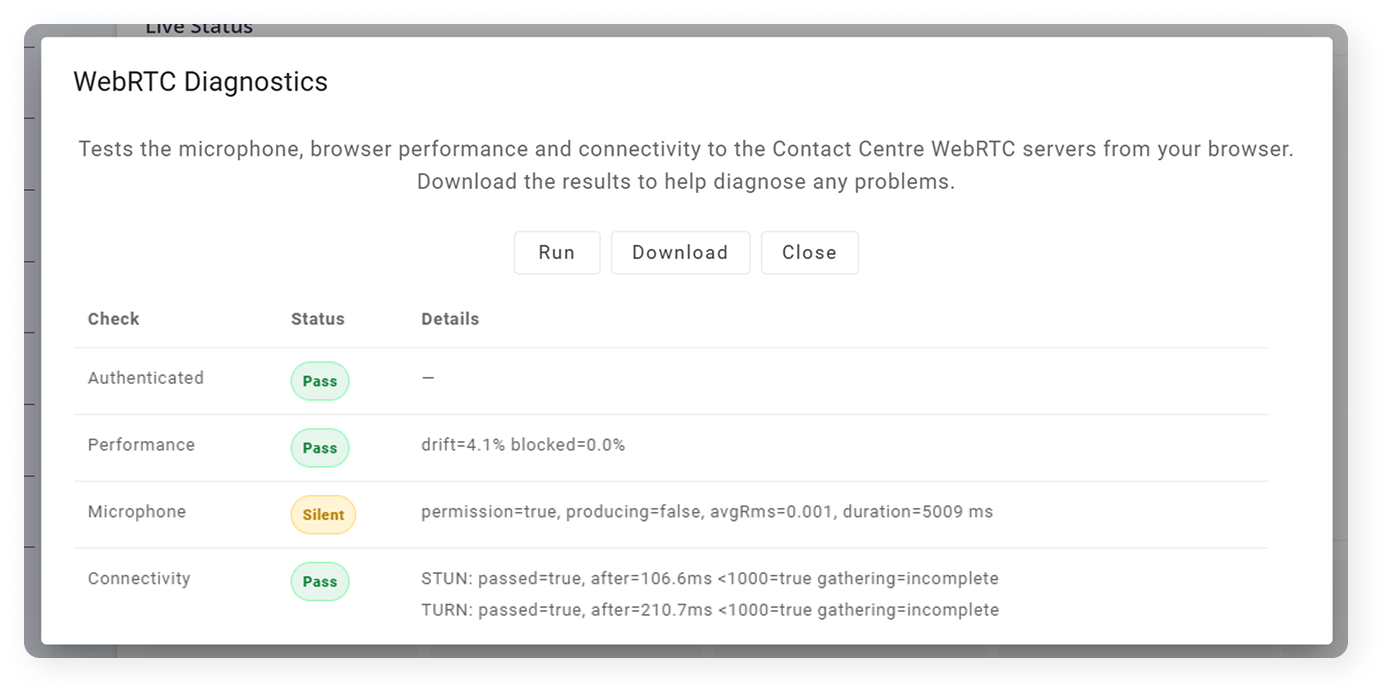
| Test | What It Does | What to Look For |
|---|---|---|
| Authenticate | Confirms the browser is properly authenticated to the WebRTC registration service and has received valid ICE server details |  Pass – The session is ready for calls Pass – The session is ready for calls Fail – Reload the page and sign in again Fail – Reload the page and sign in again |
| Performance | Measures the browser’s CPU performance and responsiveness | Pass – Browser performance is good Fail – Browser or system is overloaded; close unused apps or tabs |
| Microphone | Checks microphone permission and listens briefly for sound | Pass – Audio detected Silent – Permission granted but no sound detected; check mic input or speak during test Fail – Permission denied; allow mic access and retry Silent – Permission granted but no sound detected; check mic input or speak during test Fail – Permission denied; allow mic access and retry |
| Connectivity | Tests network reachability of the STUN and TURN WebRTC servers | Pass – All servers responded correctly Warn – One path succeeded but another timed out Fail – No valid ICE candidates; network or firewall issue Warn – One path succeeded but another timed out Fail – No valid ICE candidates; network or firewall issue |
Understanding the Connectivity Test #
The connectivity check gathers ICE candidates, which represent possible routes for WebRTC media. You’ll see separate results for STUN and TURN servers:
| Type | What It Means | Typical Issues |
|---|---|---|
| STUN (Server-Reflexive) | Verifies basic UDP connectivity and NAT traversal. | UDP 3478 blocked or STUN server unreachable. |
| TURN (Relay) | Verifies media can be relayed through the TURN server (used when direct paths fail). | Expired TURN credentials, blocked UDP/TCP 3478 or 5349, strict corporate firewalls. |
Healthy networks usually show both srflx (STUN) and relay (TURN) candidates. Partial results may still allow calls but can indicate restricted connectivity.
Useful Resources
- WebRTC Diagnostics Overview
- Agent Knowledge Base: Troubleshooting issues with WebRTC